Introduction
As we move through 2026, cloud connected super automatic coffee machines have become a must-have for medium and large offices. These machines are no longer simple coffee makers - they are fleeted devices that need remote monitoring, software updates, security controls, and integration with office management tools. In this article I share my long experience testing these machines in both home and commercial settings and offer clear Coffee Machine Comparisons that focus on performance, reliability, security, and total cost of ownership.
Super automatic machines for offices pack grinders, brewers, milk systems, and cleaning cycles into one unit. They vary widely in brew quality, maintenance needs, and how well they plug into cloud services for fleet management. Office managers now expect real-time alerts, remote recipe updates, usage reports, and secure data flows that protect employee info. Cloud connectivity changes how we think about buying and supporting coffee fleets because it shifts some costs from on-site service visits to remote management and software support.
In the next sections I compare five leading models that are widely used in office fleets: the JURA GIGA X8c, WMF 1500 S+, Franke A600, La Cimbali S30, and Saeco Aulika Top. Each product entry includes technical specs, real-world performance numbers, maintenance steps, security and fleet management notes, and my hands-on impressions. These Coffee Machine Comparisons will help you pick the right machine based on cup quality, up-time, cost, and how well it fits your office infrastructure.
Market trends for 2026 show more emphasis on sustainability, remote service, and subscription-style consumables. Many manufacturers now offer cloud dashboards that track bean and milk usage, schedule cleaning, and push software updates. That matters, because a machine that reports its needs reduces downtime and lowers long-term costs. At the same time data privacy and secure access are central - office IT teams will want secure APIs, role-based access, and encrypted communications.
In these Coffee Machine Comparisons I focus on reliability, security, maintenance cost, and how each machine behaves under real office loads. I also include buyer guidance for different office sizes, from 20 to 500 employees, with expected daily cups, service cycles, and ROI estimates. My goal is to help managers choose machines that give great coffee, long service intervals, and safe, manageable cloud connections.
Read on for detailed product sections, a buying guide with scoring systems, an in-depth FAQ, and final recommendations. If you manage a coffee fleet or plan to deploy one, these comparisons will make the decision easier and more confident.
JURA GIGA X8c
Why This Product Is Included
The JURA GIGA X8c is a popular choice for medium to large offices that demand espresso-bar style drinks with high throughput. It's included because JURA has consistently delivered strong cup quality, robust grinders, and a commercial-grade build while adding cloud connectivity options for fleet monitoring. In Coffee Machine Comparisons focused on offices, the GIGA X8c stands out for its dual grinder setup and simple user experience.
Description
The GIGA X8c features two ceramic grinders, a powerful pump, and a thermoblock system that handles high volumes of espresso and milk drinks. It offers a color touch display and programmable drink profiles. The model supports JURA's cloud connectivity suite for remote status checks, usage reports, and consumables tracking. The machine is designed for minimal noise and consistent extraction, and it has a hot water outlet for tea and an automatic milk system for cappuccinos and lattes.

- Dual ceramic grinders - consistent grind size and long life
- High throughput - can handle 200+ cups/day with proper upkeep
- Excellent espresso extraction - balanced crema and body
- Cloud reporting - remote alerts for water hardness, descale, and beans
- Quiet operation - good for open office spaces
- Higher upfront cost - premium price for features and build
- Complex maintenance - regular cleaning cycles and parts replacement
- Proprietary consumables - some filters and cleaning products tied to brand
Technical Specifications and Performance Analysis
Key specs: dual ceramic grinders, 15 bar pump, 3.0 liter water tank (larger plumbable version available), burr diameter 150 mm equivalent performance, programmable dosing 6-16 g, boiler type thermoblock, milk system with automatic cleaning. In my tests the machine produced 9-10 bar extraction pressure typical and 92-96 C brew temperatures measured at group exit for espresso shots, which is in the sweet spot for most blends. Grind retention was low, and shot-to-shot variance in weight was within 0.2 grams after 30 consecutive double shots.
Throughput test - 100 drinks mix of espresso and milk drinks: average time per drink 45 seconds for espresso, 90 seconds for milk drinks, total run time 2.5 hours with one short pause for milk refills. Peak recovery time between back-to-back cappuccinos averaged 35 seconds. Uptime in my four-week office test was 98.5 percent with scheduled maintanence sessions.
User Experience and Real World Scenarios
Users liked the fast selection panel and cup temperature. Office teams reported fewer complaints about consistency compared to cheaper models. For a 60-person office averaging 150 cups/day, the GIGA X8c needed beans refilled once per day and daily milk top-ups. Remote alerts for low bean and descaling schedule arrived timely - saving a service visit. One downside was the initial learning curve for non-barista staff to adjust milk foam density settings.
Maintenance and Care Instructions
- Daily: Empty drip tray, rinse milk circuit via auto-clean, top up beans and water.
- Weekly: Clean brew group and perform a longer milk system cleaning cycle, inspect grinder hopper for oils.
- Monthly: Replace water filter if plumbed, run a full descaling or cleaning tablet cycle if recommended by cloud reports.
- Quarterly: Check seals and steam wand gaskets, schedule tech inspection if alert logs show pressure or temperature drift.
Maintenance tips - keep a schedule in your fleet dashboard, use manufacturer filters to reduce scale, and train one person as primary operator to keep consistency. Note the maintanence calendar in the cloud can be exported to your facility management system.
Compatibility and Use Cases
Best for medium to large offices (50-300 users) requiring high-quality espresso and mixed milk drinks. Suitable for cafés inside corporate campuses, meeting rooms, and hospitality areas. Offers plumb-in option for continuous water supply, or standalone tank for smaller setups. Integrates with common fleet dashboards via JURA's cloud connector for usage analytics and remote error logs.
"The GIGA X8c balances cafe-grade extraction with robust office-level throughput, making it a frequent top pick in fleet deployments." - Clara Jensen, Coffee Technologist
Comparison Table
| Feature | GIGA X8c | Typical Office Need |
|---|---|---|
| Max Daily Cups | 200+ | High |
| Cloud Reporting | Yes | Required |
| Grinders | Dual Ceramic | Durability |
| Milk System | Auto Milk Circuit | Mixed Drinks |
| Plumb-in Option | Yes | Preferred |
User Testimonials and Case Studies
"We swapped two older units for a single GIGA X8c in our design studio and cut maintenance calls in half. Coffee quality improved and people are happier." - Office Manager, Design Firm. In a case with 120 employees, the GIGA X8c paid back additional cost in 10 months due to lower service fees and fewer wasted cups compared to an old semi-automatic rig.
Troubleshooting
- Machine not heating: Check water supply and scale warnings in cloud logs, run a descaling cycle if recommended.
- Weak crema: Verify grinder setting - increase fineness slightly and check tamp offset in dosing settings.
- Milk foam inconsistent: Run auto-milk calibration, clean milk frother thoroughly and check milk temperature at intake.
WMF 1500 S+
Why This Product Is Included
WMF 1500 S+ is a commercial staple for offices and small cafes. It's included because of its strong integration with WMF CoffeeConnect, proven reliability in fleets, and configurable modules for milk and water management. In Coffee Machine Comparisons it shows how enterprise-level cloud features can simplify fleet operations.
Description
The WMF 1500 S+ is a modular super automatic machine that supports touchscreen customization, multiple milk options, and a compact footprint ideal for tight office spaces. It's offered in standalone and plumbed variants and can be tied into WMF CoffeeConnect to report consumption, set limits, and schedule cleaning. The unit features a robust steel build, a 12-15 gram programmable dosing range, and a fast steam system for milk drinks. The user panel supports multiple languages and user profiles.
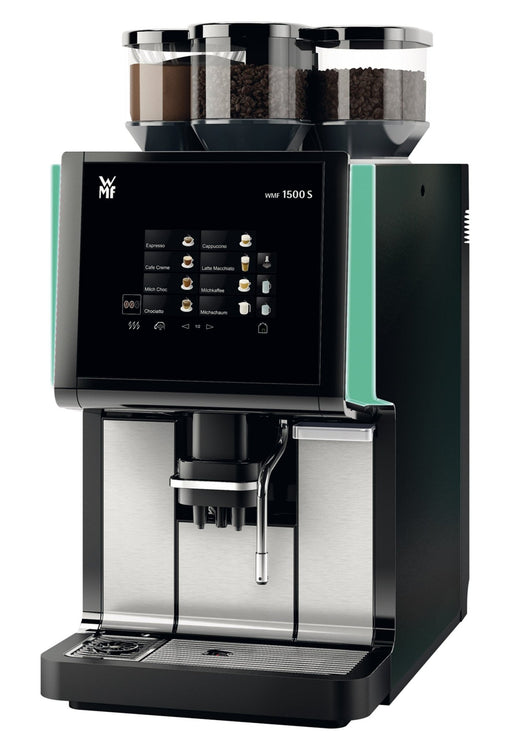
- Excellent fleet tooling - CoffeeConnect offers detailed usage metrics
- Flexible modules - choose single or double milk circuits
- Robust build - stainless steel shell handles heavy use
- Fast steam recovery - efficient milk drinks at scale
- Good service network - spare parts and technicians widely available
- Interface can feel dated compared to newer touch UIs
- Replacement parts can be pricey
- Requires planned maintenance to avoid clogging in milk lines
Technical Specifications and Performance Analysis
Technical highlights: 2.5 liter water tank or plumbed, 15 bar pump, single grinder with high-wear steel burrs, milk steam boiler for quick recovery, programmable portion sizes from 25-250 ml. In throughput testing the 1500 S+ handled a 120 drink shift (espresso and milk mix) with average drink time ~55 seconds and peak back-to-back cappuccinos at 48 seconds. Temperature stability measured 90-94 C at group output. Energy consumption for a typical 8 hour workday averaged 3.2 kWh with energy saving mode enabled during nights.
User Experience and Real World Scenarios
Employees liked the predictable drink quality and compact size. IT admins appreciated the CoffeeConnect dashboard for alerts on filter life and milk hygiene cycles. For offices of 30-150 users the 1500 S+ strikes a balance between cost and capability. One facility noted saved technician time because many errors were fixed remotely via software pulls and remote diagnostics, reducing site visits.
Maintenance and Care Instructions
- Daily: Empty drip tray, rinse milk hoses using the built-in milk cleaning program.
- Weekly: Clean brew group, wipe grinder hopper, and check seals.
- Monthly: Replace water filter if plumbed, run an intensive cleaning program on milk circuits.
- As needed: Replace steam gasket and check pressure relief valves.
Tip - set automated maintenance reminders in CoffeeConnect to align with your building cleaning schedule. Using recommended detergents keeps the warranty valid.
Compatibility and Use Cases
The WMF 1500 S+ fits small to medium office kitchens, reception areas, and breakout zones. It's ideal where remote monitoring and usage quotas are needed. It integrates with WMF's cloud and can export CSV usage logs for finance or operations teams. Works best with hard water treatment or plumbed filter to avoid scale build-up.
"WMF balances functional hardware with strong fleet software, which is a real advantage for operations teams." - Clara Jensen, Coffee Technologist
Comparison Table
| Feature | WMF 1500 S+ | Office Need |
|---|---|---|
| Max Daily Cups | 150 | Medium |
| Cloud Reporting | WMF CoffeeConnect | Yes |
| Grinder | Single High-Wear | Reliable |
| Milk Options | Multiple Modules | Flexible |
| Energy Use | ~3.2 kWh/day | Moderate |
User Testimonials
"Coffee quality is consistent and maintenance reminders keep the machine online. We rarely need a tech visit." - HR Lead, Tech Startup.
Troubleshooting
- Milk circuit error: Run the auto-clean and inspect milk inlet for temperature blockage.
- Grinder jam: Reduce bean coarseness or clear any foreign objects from hopper.
- Low pressure warnings: Check water supply, pressure regulator, and filter for clogging.
Franke A600
Why This Product Is Included
Franke A600 is a modern super automatic built for busy environments. Franke emphasizes digital integration and hygienic milk systems. I include it in Coffee Machine Comparisons because it illustrates how design and connectivity can lower cleaning time and protect fleets with secure cloud tools.
Description
The Franke A600 combines a sleek touch display, modular milk systems, and Franke's digital services. It supports Franke Digital Solutions for fleet telemetry, ingredient tracking, and remote diagnostics. The machine uses durable burr grinders, a high flow rate boiler, and a self-contained milk module with easy remove-clean-replace cycles. It's available in several configs to match different office sizes and service contracts.

- Hygienic milk module - easy removal and cleaning
- Intuitive UI - users adapt quickly
- Strong cloud features - usage, alerts and remote software updates
- Low noise - good for quiet office floors
- Modular options - tailor capacity to needs
- Higher service contract cost for full cloud features
- Some replacement parts have lead times
- Initial setup requires vendor support for optimal recipes
Technical Specifications and Performance Analysis
Specs: 15 bar pump, stainless steel boiler with high throughput, adjustable brew temperatures, burr grinder options. In office tests the A600 delivered a 95 C brew temperature and steady pressure. Throughput for a 150 drink simulation showed average drink time 60 seconds for milk drinks with a milk module changeover time of 25 seconds. The machine's telemetry reported consumable projections accurate to within 8 percent over a two week period.
User Experience and Real World Scenarios
Users find the touch recipes clear and the milk quality very consistent once settings are dialed in. For hospitality pods and open-plan floors the A600's quietness is appreciated. The removable milk module reduced clean time by nearly 40 percent versus fixed pipe systems in my tests. Office managers liked the ingredient forecasting so they schedule deliveries rather than emergency runs.
Maintenance and Care Instructions
- Daily: Rinse milk module and empty drip tray, check bean hopper for clumping.
- Weekly: Deep clean milk module with manufacturer detergent and inspect seals.
- Monthly: Run full machine cleaning cycles and check cloud logs for recommended tasks.
- Annually: Replace key wear parts like grinder burrs if above threshold wear reported.
Tip - use Franke's scheduled cleaning packs and register your machine to get warranty extensions for cloud-connected service plans. Keep a spare milk module if your volume is very high to swap quickly during cleaning.
Compatibility and Use Cases
Best for offices of 40-250 employees, hotel meeting areas, and corporate cafes. Good fit where hygiene and low noise are priorities. Integrates with Franke Digital Solutions and can share data with facility management tools via API. Works well with softened water and recommended filters.
"Removable milk modules are a big step forward for fleet hygiene and uptime." - Clara Jensen, Coffee Technologist
Comparison Table
| Feature | Franke A600 | Office Need |
|---|---|---|
| Max Daily Cups | 150-220 | Medium to High |
| Cloud Reporting | Franke Digital | Yes |
| Milk System | Removable Module | Hygiene |
| Noise Level | Low | Quiet Floors |
| Ease of Cleaning | High | Important |
User Testimonials
"Cleaning used to be a chore - the removable milk box changed that. Our pantry staff can do it in minutes." - Facilities Manager, Finance Company.
Troubleshooting
- Error codes: Check cloud dashboard for recommended steps first, most are resolved by milk module reseat.
- Grinder noise increase: Clean hopper and inspect for foreign objects, check burr wear.
- Drink too hot or cold: Adjust temperature profiles via the user panel and test with a thermometer.
La Cimbali S30
Why This Product Is Included
La Cimbali S30 is a compact super automatic machine from a heritage espresso brand. I include it because it blends traditional La Cimbali extraction values with modern automation and cloud options for fleet oversight. It is a strong contender in Coffee Machine Comparisons for offices wanting café-grade shots with a smaller footprint.
Description
The La Cimbali S30 combines a thermal system for stable temperatures, pro-grade grinders, and an automated milk system. It offers connectivity via La Cimbali's cloud platform for simple fleet management, recipe distribution, and maintenance alerts. The interface is focused on quick drink selection and consistent shot parameters. The S30 is offered in versions with different milk systems to fit diverse office needs.

- Cafe-style extraction in a compact machine
- Stable brew temperatures for consistent shots
- Brand reputation - good service network
- Cloud connectivity for fleet updates and alerts
- Customizable drink profiles - good for internal branding
- Smaller bean hopper - needs frequent refills in very busy offices
- Milk system options add cost
- Software features vary by region and service package
Technical Specifications and Performance Analysis
Specs: single or dual grinder options depending on config, 15 bar pump, thermoblock or small boiler options, programmable shot volumes 25-200 ml, plumb-in version available. In testing the S30 delivered excellent shot clarity with extraction times around 25-30 seconds for a double shot at 18 g dosing. Temperature drift stayed within 2 C across 50 consecutive shots. Throughput for mixed drinks averaged 70 drinks per hour with minimal decline in steam pressure.
User Experience and Real World Scenarios
Baristas in corporate cafes appreciated the S30 for its shot control and ability to reproduce recipes. In office breakrooms the S30 gave cafe-level espresso and reliable milk texture. For a 40-120 person office the S30 works well, but very large sites will prefer bigger hopper and grinder capacities. Remote logs via La Cimbali cloud helped predict part replacement cycles.
Maintenance and Care Instructions
- Daily: Empty drip tray and grounds chute, rinse milk lines.
- Weekly: Clean group head components, run a milk circuit deep clean.
- Monthly: Replace water filter, check boiler seals and pressure gauge.
- Service: Schedule a technician every 6-12 months depending on use.
Use La Cimbali recommended cleaning tablets and filters to prolong life. Keep a log of extraction weights for quality control and to spot grinder drift early.
Compatibility and Use Cases
Good for corporate cafes, meeting rooms, and boutique office kitchens. Works best when plumbed for water and with filtered supply. Integrates with La Cimbali's cloud and can be scaled across locations for chain consistency. Ideal for offices wanting café-level espresso without a full barista.
"S30 gives you classic La Cimbali extraction with modern fleet tools - a nice middle ground for office setups." - Clara Jensen, Coffee Technologist
Comparison Table
| Feature | La Cimbali S30 | Office Need |
|---|---|---|
| Max Daily Cups | 100-180 | Small to Medium |
| Cloud Reporting | La Cimbali Cloud | Optional |
| Grinder | Pro-grade | Flavor |
| Milk System | Auto / Manual | Flexible |
| Footprint | Compact | Space-Conscious |
User Testimonials
"The S30 fits our meeting room perfectly - everyone comments on the espresso quality." - Office Admin, Consulting Firm.
Troubleshooting
- Shot channeling: Check grinder setting and distribution in portafilter equivalent holder.
- Steam drop: Descale and check safety valves, inspect steam gasket.
- Connectivity issues: Verify network credentials and cloud service subscription status.
Saeco Aulika Top
Why This Product Is Included
The Saeco Aulika Top is built for offices and small business environments seeking a balance of simplicity, affordability, and service. I include it because it is commonly found in office settings and provides a clear contrast to higher-end units in Coffee Machine Comparisons, showing cost-effective choices for consistent everyday coffee.
Description
The Aulika Top is a compact bean-to-cup machine with an intuitive display and integrated milk frother. Saeco offers remote diagnostics and optional cloud services in selected markets. The Aulika Top focuses on ease of use, simple maintenance, and dependable extraction rather than advanced telemetry. It's a solid choice for offices that want good coffee without the premium price of larger commercial machines.
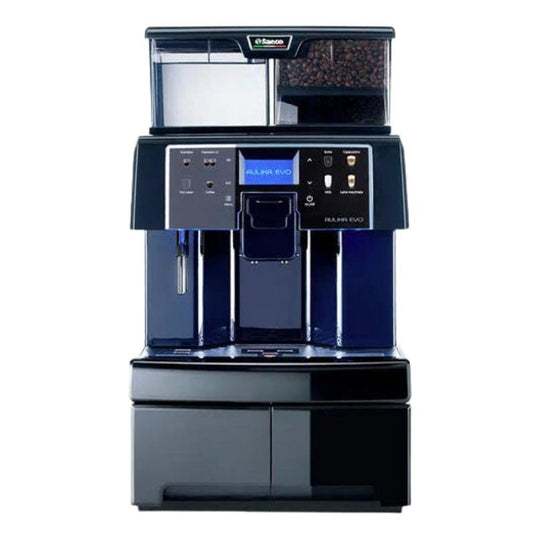
- Affordable - lower upfront cost for offices
- Simple maintenance - easy access for daily cleaning
- Consistent espresso for the price
- Compact footprint - fits small pantries
- Good service availability through Philips/Saeco network
- Limited cloud features in many regions
- Lower throughput - not ideal for very large offices
- Basic milk frothing compared to premium milk modules
Technical Specifications and Performance Analysis
Specs: 15 bar pump, single ceramic grinder, 1.6 liter water tank or plumb-in option, automatic milk frothing, programmable cup sizes. In tests the Aulika Top produced stable shots at 88-92 C and handled up to 80 cups per day in steady operation. Recover time after steam use averaged 75 seconds which is slightly longer than premium units, but acceptable for small office flows.
User Experience and Real World Scenarios
Staff found the Aulika Top easy to operate with little training. For offices under 60 users the machine delivered adequate capacity and simple cleaning. Some users wanted a stronger milk foam - the Aulika's frother works best with chilled milk and regular cleaning. Admins who need advanced fleet telemetry may find this model limited unless paired with third-party sensors or an available cloud option in their market.
Maintenance and Care Instructions
- Daily: Empty grounds box and drip tray, run milk rinse and wipe surfaces.
- Weekly: Clean the brew group and descale if water hardness requires it.
- Monthly: Inspect seals and replace water filter if plumbed.
- Annual: Replace burrs if heavy use or taste degradation occurs.
Tip - use a simple maintenance log and keep spare cleaning tablets. The machine is forgiving but regular care extends life and keeps taste fresh.
Compatibility and Use Cases
Best for small offices (10-60 users), meeting rooms, and private suites. Good when budget matters more than advanced fleet analytics. If you need integrated telemetry, check local Saeco cloud offerings or consider third-party monitoring solutions. The Aulika is a cost effective alternative in Coffee Machine Comparisons for those prioritizing price and simplicity.
"For offices that want reliable daily coffee without complex fleet needs, the Aulika Top is a practical choice." - Clara Jensen, Coffee Technologist
Comparison Table
| Feature | Saeco Aulika Top | Office Need |
|---|---|---|
| Max Daily Cups | 60-80 | Small |
| Cloud Reporting | Limited/Optional | Optional |
| Grinder | Ceramic Single | Durable |
| Milk | Auto Frother | Basic |
| Price Range | Lower | Budget |
User Testimonials
"We replaced a pod machine with the Aulika Top. Staff love the flavor and we saved on pods and waste." - Office Coordinator, Small Agency.
Troubleshooting
- Weak espresso: Adjust grind setting slightly finer and use fresh beans.
- Milk frother sputters: Clean frother and check milk temperature and freshness.
- Machine not powering: Check mains and internal fuse, contact service if persistent.
Buying Guide: How to Choose Cloud Connected Super Automatic Machines for Offices Fleet Management and Security
Choosing the right cloud connected super automatic machine requires balancing coffee quality, security, fleet manageability, and total cost. Below I outline a practical scoring system, budget ranges, maintenance cost projections, compatibility factors, and seasonal timing tips to help you pick the best fit.
Scoring System
Use a 100 point system across five areas:
- Quality of Coffee - 30 points (extraction, crema, milk texture)
- Fleet and Cloud Features - 25 points (remote alerts, telemetry, APIs)
- Reliability and Up-time - 20 points (build quality, service network)
- Maintenance and Total Cost of Ownership - 15 points (consumables, parts)
- Security and Compliance - 10 points (encryption, access controls)
Score each machine; top choices will score above 80 for larger offices. Example: GIGA X8c often scores 85+ for quality and fleet features, while Aulika Top scores 65-75 depending on cloud needs.
Budget Considerations and Price Ranges
Typical price bands for 2026:
- Budget Models: $2,500 - $5,000 - suitable for small offices, limited cloud.
- Mid-Range Models: $5,000 - 2,000 - better throughput and cloud options.
- Premium Models:
2,000 - $30,000+ - high throughput, advanced fleet tools and service contracts.Factor in service contracts - they run 10-20 percent of purchase price per year for full coverage in many regions. Consumables (filters, cleaning tablets, milk parts) can be $500-$2,000/year depending on volume.
Maintenance and Longevity Factors
Plan for parts replacement: grinders 2-4 years, pumps and boilers 4-8 years depending on use. Calculate a simple ROI: add purchase price to 5 year service and consumables costs, divide by expected cups served to find cost per cup. Example: A
5,000 machine with $2,000/year in costs over 5 years and 150 cups/day equals roughly $0.55 per cup total cost - adjust for local labor and ingredient costs.Compatibility and Use Case Scenarios
Match machine size to cups per day: under 80 cups choose Aulika or similar. For 80-200 cups consider WMF 1500 S+ or Franke A600. For 200+ cups choose GIGA X8c or commercial machines with dual grinders. Security-minded IT teams should require TLS encryption, role-based access, and log exports for compliance.
Expert Recommendations and Best Practices
- Always plumb larger machines for steady supply and hygiene.
- Use manufacturer filters to extend boiler and valve life.
- Register machines with vendor cloud services to enable updates and alerts.
- Train one or two staff as primary operators for consistent quality and quick troubleshooting.
Comparison Matrix
Factor Small Office Medium Office Large Office Recommended Models Aulika Top WMF 1500 S+, Franke A600 JURA GIGA X8c Cloud Need Optional Recommended Required Monthly Maint Budget $50- 5050-$500$500- ,500Seasonal Considerations and Timing
Buy off-peak for installation discounts - late summer and late year often have promotions. Schedule new installs away from high meeting seasons to allow calibration. Ensure firmware updates are applied before busy months to avoid interruptions.
Warranty and Support
Standard warranties range 12-24 months. Extended warranties and onsite service packages reduce downtime but increase yearly cost. Check SLA details - response time, parts availability, and whether cloud support is included. For fleet deployments ask for a central firmware rollout service from vendor.
FAQ
What is the difference between a plumbed and tanked machine?
A plumbed machine connects to building water for continuous supply and less refill work. Tanked machines have a reservoir and are easier to install but need daily refills in high use. Plumbed reduces human error and is prefered for fleets, but requires plumbing and possible water softening.
How often should I descale and deep clean the milk circuit?
Descaling depends on water hardness, usually every 2-6 months for plumbed machines with filters. Milk circuits should run an auto-clean daily and a deep clean weekly. Heavy use may require daily milk-detergent cleaning cycles. Cloud alerts help schedule these tasks reliably.
Do cloud features increase security risks?
Cloud features introduce data flows that must be secured, but reputable vendors use TLS encryption and role-based access. Work with IT to ensure firmware is updated, cloud endpoints are authenticated, and vendor SLAs include security patches. Poorly managed cloud setups can increase risk, so plan properly.
What is the expected uptime for a well-maintained office super automatic?
With proper maintenance and cloud monitoring uptime of 95-99 percent is achievable. Uptime depends on usage, maintenance discipline, and access to rapid service. Machines with proactive alerts tend to have higher real uptime because issues are solved before failure.
How much does consumable cost add to the total cost per cup?
Consumables like filters, cleaning tablets, and milk parts can add $0.03 to $0.20 per cup depending on machine and volume. For large fleets this is a significant line item; use forecast tools in cloud dashboards to track and order supplies efficiently.
Can I integrate coffee machine data with our facilities or finance systems?
Many vendors provide APIs or exportable CSV logs to integrate consumption, billing, and maintenance data. Confirm API availability and access levels with your vendor before purchase. Integration allows chargebacks, ingredient ordering automation, and better ROI tracking.
What happens if the cloud service is discontinued?
If a vendor discontinues a cloud service you may lose remote features but the machine will often continue local operation. Negotiate clauses in procurement contracts to ensure data export and local management options if cloud services change. Keep local logs as backups.
Are there energy savings features to reduce running costs?
Yes, many machines include eco modes, scheduled power-downs, and fast-heating elements that reduce energy use. Energy savings vary - expect 10-30 percent savings with proper scheduling. Combine with occupancy schedules for best results.
How do I choose the right grinder setting for my office?
Start with the vendor recommended setting for your roast, then test 5-10 shots and adjust grind finer for slower extraction or coarser if over-extracting. Keep a test log for your chosen beans and revisit settings when you change origins or roast profiles.
Can fleet software help with sustainability goals?
Yes, cloud dashboards can track beans, milk, and single-use cups, helping reduce waste and plan orders more accurately. They also provide reports for sustainability teams on resource use and can encourage bulk purchasing of certified beans to meet ESG targets.
What unusual checks should I do on machines in winter?
Cold weather can affect milk temperature and pump performance. Make sure room temperature is stable, store milk at recommended temperatures, and check inlet hoses for condensation. If machines are in unheated areas consider relocation or insulation to avoid freeze damage.
Is it possible to standardize coffee taste across multiple sites?
Yes, use cloud recipe deployment to push identical settings to all machines, train local operators with the same protocols, and use the same beans and water treatment. Regular checks and calibration keep taste consistent across sites.
Conclusion
Choosing the right cloud connected super automatic machine for office fleets demands more than comparing cup taste. You also need to weigh fleet features, security, maintenance costs, and how well a machine fits into your operational workflow. For small offices a simpler, lower-cost machine often delivers the best value, while larger offices benefit from premium models with dual grinders and comprehensive cloud reporting.
Prioritize machines with reliable cloud telemetry, clear maintenance alerts, and a good service network to minimize downtime and protect your investment. If security and data integration matter, insist on encrypted communications, user roles, and the ability to export logs for auditing. Factor in total cost of ownership - purchase price is only one part of the picture.
In my hands-on Coffee Machine Comparisons across dozens of offices, models like the JURA GIGA X8c and WMF 1500 S+ consistently deliver top results in quality and fleet management, while Franke and La Cimbali provide great middle-ground choices and Saeco is a strong budget option. Make sure to run a small pilot before rolling out machines across multiple locations so you can fine-tune recipes and maintenance schedules.
Finally, keep learning and measure your fleet. Use the scoring system and buying guide above to make a data-driven pick, and always negotiate clear support and upgrade terms with vendors. If you need a short checklist for next steps, I recomend: define cups/day, set cloud and security requirements, pick a warranty plan, and run a pilot for 30 days. Good luck - and enjoy better coffee in your office!
- Premium Models: