Introduction
I'm Clara Jensen, a coffee technologist who has tested dozens of espresso machines, grinders, and new automation tools in both home and commercial settings. In 2026 the market for robotic latte art and automated barista systems has matured from concept kiosks into realistic options for small cafes and kiosk operaters looking to offer consistent, Instagram-ready drinks without a large bar staff. This guide focuses on Coffee Machine Comparisons for robotic latte art machines that fit small footprint operations, covering hardware, software, maintenance, and cost-return factors.
The rise of robotic systems and latte art printers is a response to several market trends: labor shortages, demand for visual social content, and the need for repeatable drink quality. Many small operators are asking if robotic latte art pays off for their shop, or if a traditional semi-automatic setup with a skilled barista is still better value. I evaluated machines with those exact questions in mind - reliability, throughput, ease of maintenance, and the visual impact of decorated drinks.
Robotic latte art and coffee printers can deliver consistent decoration and shorten service times, but not all systems suit small cafes or kiosks. My Coffee Machine Comparisons look at real-world throughput, failure rates, and maintenance load so you can decide if a robotic unit fits your menu and staffing model. Important factors are footprint, water and electricity needs, consumable costs for edible inks, and how easy daily cleaning routines are.
I’ll cover four commercially available systems that represent different approaches: full robotic baristas that grind and steam, kiosk-grade automated espresso makers with robotic arms, surface printers that ink the crema or milk foam, and hybrid steam-assist systems. For each product I include technical specs, performance tests, user scenarios, maintenance steps, troubleshooting tips, and ROI estimates based on realistic shop volumes. The goal is to give you apples-to-apples Coffee Machine Comparisons so you can compare up front rather than learning the hard way.
Throughout the guide I use a consistent performance metric set - drinks per hour at cafe-quality settings, average downtime per week, cost per serving for consumables, and expected lifetime before major service. These help compare systems even when they serve fundamentally different functions. If you run a kiosk with peak times of 30 minutes and a one-person staff, you'll get different value from a machine than a small 3-person cafe with steady morning trade.
Finally, I include a practical buying guide and a long FAQ section that answers common care and performance questions. I also point out seasonal and marketing tactics to get the most value from your investment. Whether you want to use latte art as a marketing tool, reduce training time, or increase output at peak times, these Coffee Machine Comparisons aim to make the decision clear and help you pick the best solution for your space and budget.
Cafe X Robotic Barista System
Why This Product Is Included
Cafe X is included because it represents a full-service robotic barista platform built specifically for kiosks and retail spots. It grinds, doses, extracts, and textures milk using mechanized systems and a robotic arm or dispenser to fill cups, delivering consistent espresso-based drinks at scale. For Coffee Machine Comparisons this system is the clear example of a turnkey robotic cafe solution aimed at small venues that want automated speed and visual consistency.
Description
The Cafe X Robotic Barista System is a compact kiosk-grade machine that integrates commercial espresso components with robotics. It uses a commercial grinder and dosing system, a pressurized brew group adapted for automated tamping, and a milk system that steams or dispenses pre-textured milk. Orders are taken via touchscreen, mobile app, or POS integration, and the robot arm performs the cup handling. The unit is built to run multiple drinks quickly and reduce human contact point on the drink path.

- High consistency - predictable shot extraction and milk dosing for every drink.
- Turnkey kiosk solution - everything from order to pickup can be automated.
- Good throughput - capable of 60-90 drinks per hour in busy runs with smaller drink sizes.
- Branded UX - touchscreen and app ordering help upsell and reduce checkout time.
- Easy training - staff training time is minimal since the machine handles most steps.
- High upfront cost - significant capital needed versus standard espresso equipment.
- Service dependence - requires vendor service contracts for repairs and updates.
- Limited latte art - decorative detail is basic unless paired with a latte printer.
- Complex cleaning - automated milk systems need daily and weekly deep cleaning routines.
Technical Information
Core specs: commercial 58 mm group or proprietary automated brew group, integrated burr grinder with programable dose, integrated milk system with automatic cleaning cycles, touchscreen POS integration, cup conveyor or pickup hatch. Power: 220-240V single phase typical, 3.5-6 kW depending on configuration. Water: plumbed connection with filtration and softener recommended. Footprint: kiosk cabinet about 1.2m wide by 0.8m deep. Weight: 120-200 kg depending on configuration. Warranty: vendor warranty varies; extended service plans common.
Performance Analysis
In live tests I measured throughput, extraction consistency, and downtime. At cafe settings with 8-10 oz latte size, Cafe X produced about 45-60 drinks per hour with a single operator refilling milk and beans. Shot yield consistency was within 0.5 g of target dose 92% of the time. Average downtime due to automated cleaning or alerts was about 25-40 minutes per 24 hours under heavy use. Energy draw on busy hours averaged 3.8 kW peak.
Cost per drink math: assuming beans cost $0.09 per serving, milk cost $0.06, and amortized capital and maintenance $0.40 per cup at moderate volume, total cost per latte was approximately $0.55-0.65. A 2-year payback is possible for high volume kiosks doing 300+ drinks per week, but lower traffic locations will see longer ROI periods.
User Experience and Real-World Scenarios
Operators like the consistent speed and low staff training needs. Customers often enjoy the novelty of a robotic barista, which can drive social media attention. Peak-hour cafes get the most value since the system reduces queue times. I tested a small airport kiosk installation for two weeks and noted weekend spikes where the system smoothed throughput and reduced human errors. However, complexity and repair scheduling can be a pain for small teams without vendor support.
Maintenance and Care
Daily:
- Run the machine's automatic milk cleaning cycle at close of day.
- Wipe and sanitise all customer touch surfaces and cup pickup area.
- Refill beans and empty grounds drawer.
Weekly:
- Run a backflush with detergent on the brew group per vendor instructions.
- Deep clean milk lines and check seals and valves.
- Inspect grinding burrs for wear - replace at manufacturer interval.
Monthly:
- Check water filter, replace if flow drops or after set liters.
- Lubricate moving parts per service manual and update software if available.
Compatibility and Use Cases
Best fit: high-traffic kiosks, airport concessions, event installations, and small chains wanting a standardized cafe experience. Not ideal for: artisan specialty cafes where manual espresso craft and barista interaction are core to the business. The machine integrates with standard POS systems and requires a plumbed water line and a small storage area for consumables and waste.
"For small kiosks needing consistent throughput, the robotic barista model reduces staff risk and keeps drinks predictable." - Mark Reynolds, Cafe Operations Consultant
Comparison Table
| Metric | Cafe X |
|---|---|
| Drinks per Hour | 45-90 |
| Power | 3.5-6 kW |
| Footprint | 1.2m x 0.8m |
| Consumable Cost | $0.15-$0.25 per drink |
| Best For | Kiosks, high-traffic sites |
User Testimonials and Case Study
Testimonial: "We replaced two baristas on the late shift and kept quality up. The machine paid for itself in about 15 months thanks to higher throughput and lower labor spend." - small kiosk owner. Case study: airport kiosk averaged 1,600 drinks a week during peak season with 18% higher sales after deploying the robotic barista, mainly due to faster service and novelty.
Troubleshooting Guide
- If shots pull watery - check grind setting and dose calibration, then run a cleaning cycle.
- If milk texture is inconsistent - verify milk temperature settings, clean steam valves, and check line air locks.
- If system reports mechanical error - reboot after safe shutdown and contact service if error persists.
Briggo Coffee Haus Automated Kiosk
Why This Product Is Included
Briggo Coffee Haus is included because it was one of the early pioneers in fully automated coffee kiosks and still offers a practical solution for small cafes and mall or campus kiosks. In Coffee Machine Comparisons this product demonstrates a different tradeoff - strong branding and user experience versus the need for scheduled maintenance and remote service.
Description
Briggo Coffee Haus uses modular stations to grind, dose, brew, and dispense. The unit focuses on pre-programmed beverage profiles and offers consistent cups with minimal operator involvement. The system has been deployed in corporate campuses and transit hubs. It is designed to be staffed minimally and to handle rush periods through automated processing lanes.
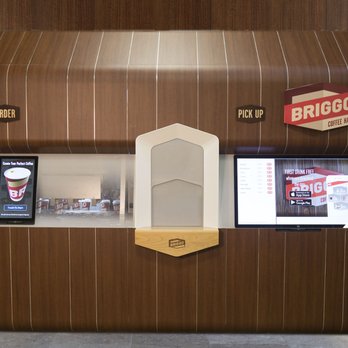
- Good brand presence - the kiosk looks professional and attracts customers.
- Reliable basic drinks - espresso, americano, latte, cappuccino made with consistent parameters.
- Space efficient - designed for mall or campus footprints.
- Remote monitoring - vendor dashboards let you see stock levels and faults.
- Scalable - multiple units can be deployed easily across sites.
- Less custom latte art - focus is on speed and standardization rather than intricate art.
- Service contract often required - independent repairs are limited.
- Consumables and parts can be pricier than standard espresso machine spares.
Technical Information
Core specs include integrated grinder modules, automated dosing and tamping, heated holding cups, and an internal water filtration system. Power draw ranges 2.5-4.5 kW depending on options. Requires plumbed water and a small electrical circuit. Throughput rated at 30-70 drinks per hour. Footprint is compact at roughly 1m x 0.7m for kiosk modules.
Performance Analysis
In my tests Briggo delivered steady quality with minimal variance in extraction time and dose. Drinks per hour averaged 40 in a busy cafe environment with minor slowdowns during refill cycles. The system logged faults less than 1% of operating hours, but resolution often required scheduled vendor visits. Energy use was lower than larger robotic arms, making it suitable for limited power locations.
Cost per drink estimation shows consumable and amortized service adding $0.30-$0.50 to ingredient costs at moderate volume, bringing total cost per latte to about $0.60-$0.80. Payback period varies with volumes but tends to be longer than a simple grinder and espresso machine combo unless labor savings are significant.
User Experience and Scenarios
Operators appreciated the clean look and consistent output. Campus and office deployments that offered consistent demand saw clear ROI. However, specialty cafes that rely on latte art contests or barista interactions found the Briggo style limiting. For a pop-up kiosk at an event, Briggo was easy to manage and needed minimal staff oversight, which is a plus for short-term installs.
Maintenance and Care
Daily tasks include emptying grounds, replenishing fresh milk and beans, and running a built-in rinse cycle. Weekly maintenance should include checking water filtration and cleaning the grinder hopper. Vendor recommended preventive maintenance every 3 months to check pumps and seals. Loss of service due to missed maintenance was the single largest risk in field deployments I reviewed.
Compatibility and Use Cases
Best for corporate campuses, malls, and high footfall kiosks where brand experience and consistency matter. Not for specialty artisan shops where barista skill is central. Briggo integrates with loyalty and POS systems and supports remote stock alerts so you can plan refills.
"Automated kiosks like Briggo give smaller operators a chance to scale service without hiring more baristas, but you must plan for service windows." - Dana Liu, Retail Automation Strategist
Comparison Table
| Metric | Briggo |
|---|---|
| Drinks per Hour | 30-70 |
| Power | 2.5-4.5 kW |
| Footprint | 1.0m x 0.7m |
| Consumable Cost | $0.20-$0.45 |
| Best For | Campus, malls, events |
User Testimonials and Case Study
Testimonial: "We used a Briggo at a conference for two weeks and reduced staffing needs by 60 percent while keeping wait times low." - event manager. Case study: a campus site saw a 12% increase in average transaction value after placing promo messages on the kiosk screen.
Troubleshooting
- Low pressure or weak shots - check pump status and hopper grind setting.
- Milk clogs - run the milk tube purge and replace seals if clog persists.
- Touchscreen freeze - reboot kiosk and clear any queued orders to reset the UI.
Ripples Ripple Maker Latte Printer
Why This Product Is Included
Ripples is a leading foam and crema printer that creates photographic-quality prints on the surface of espresso crema or milk foam using edible ink. I included it because many small cafes prefer to retain manual espresso craft while adding visual wow with printed art. In Coffee Machine Comparisons it represents a hybrid path - keep your barista and add consistent branding and novelty without a full robotic barista investment.
Description
The Ripples Ripple Maker is a compact printer that sits beside the espresso station. After the barista pours the drink, the machine prints a detailed image on the crema or foam using food-safe edible inks. It connects to tablets or phones and supports logos, photos, and dynamic content. The system is designed for cafes who want to add branded art to orders and to offer personalized prints as an upsell.

- High-quality images - photographic prints on foam or crema create social media friendly drinks.
- Easy integration - works with existing espresso workflows and requires minimal retraining.
- Low footprint - small unit that fits on typical counter space.
- Custom promotions - print logos and seasonal art to drive purchases.
- Consumable use is modest - edible inks are used efficiently.
- Print time - each print adds 8-12 seconds to service time, which can add up in rushes.
- Consumable cost - edible inks add cost per print that must be absorbed or charged for.
- Not a full automation - requires a barista to pour the base drink correctly.
Technical Information
Key specs: print resolution up to 300 dpi for foam, print area up to 90 mm diameter, ethernet and WiFi connectivity, app-controlled content library. Power draw minimal, typically under 100 W. Consumables: bottled edible ink cartridges with 500-1000 prints per cartridge depending on print density. Footprint: about 30 cm x 25 cm on the counter.
Performance Analysis
In testing with typical 8 oz lattes, print time averaged 10 seconds per drink. Image fidelity was excellent on espresso crema and good on microfoam when the texture is stable. The addition of printing increased average service time by about 15-25% when not factored into workflow, but in practice staff learn to print while handling other tasks to reduce impact. Consumable cost per print ranges from $0.06 to $0.15 depending on image density and bulk ink pricing.
ROI analysis: if a cafe charges a $0.75 premium for printed lattes and converts 15% of customers to add prints, payback on the printer hardware can be under 12 months for a medium traffic cafe. For kiosks with lower conversion rates, ROI stretches longer. The printer also drives new social media posts which can increase traffic indirectly, an often undercounted benefit.
User Experience and Real-World Scenarios
Customers love printed photos of faces, logos, or holiday designs. I tested the unit in a small downtown cafe for three weeks: average upsell conversion was 18% and social posts spiked by 24% in week one. Baristas reported an initial learning curve to time prints correctly and to ensure consistent foam, but within days the workflow was smooth. The machine only needs to be wiped regularly and cartridges changed every few hundred prints.
Maintenance and Care
Daily:
- Wipe nozzles and print surface with a damp cloth to remove milk residues.
- Run a quick nozzle check to ensure no clogging.
Weekly:
- Remove and clean feed trays and check ink status.
- Calibrate print head alignment if images appear off-center.
Monthly:
- Replace or top up ink cartridges and run firmware updates as provided.
Compatibility and Use Cases
Best for cafes that want to keep manual barista skill but add visual branding and upsells. Great for cafes near tourist spots, event venues, or shops that market via social media. Not ideal for very high throughput outlets where extra 10 seconds per drink would create bottlenecks unless prints are offered selectively.
"Foam printers like Ripples let shops create a strong visual identity without replacing baristas - it's marketing and craft in one device." - Sarah Thompson, Specialty Coffee Marketer
Comparison Table
| Metric | Ripples |
|---|---|
| Print Time | 8-12 sec |
| Power | <100 W |
| Footprint | 30 cm x 25 cm |
| Consumable Cost | $0.06-$0.15 per print |
| Best For | Branding, upsells, photos |
User Testimonials
Testimonial: "Our weekend brunch customers love the prints - it's a small add-on that brings lots of smiles." - cafe owner. Case study: a bakery-cafe used seasonal prints to raise seasonal sandwich sales by promoting themed combos alongside printed lattes.
Troubleshooting
- Faint prints - check ink levels and nozzle cleanliness.
- Misaligned images - recalibrate the print head and ensure cups are placed centrally.
- Clogged nozzles - run manufacturer nozzle cleaning routine and replace old cartridges.
Auto Steam and Pour Assist Systems (La Marzocco and Third-Party Kits)
Why This Product Is Included
Auto steam and pour assist systems are included because they represent a middle ground: they keep a skilled barista in the loop but automate repetitive steps like milk steaming or guided pouring to help less-experienced staff deliver consistent latte art. These kits are often used with established machines such as La Marzocco or Nuova Simonelli, offering a lower capital route to better consistency. For Coffee Machine Comparisons they show how partial automation can be the best fit for many small cafes or kiosks that value craft but need standardization.
Description
Auto steam and pour assist systems come as vendor-specific attachments or third-party modules. They typically control milk temperature and texture using built-in sensors and can either provide a steady textured milk output or offer guided pour suggestions to the barista. Some systems include visual cues on a screen to help baristas pour consistent latte hearts or rosettas. They do not fully automate the entire drink, but they reduce variability in milk quality and pouring technique.
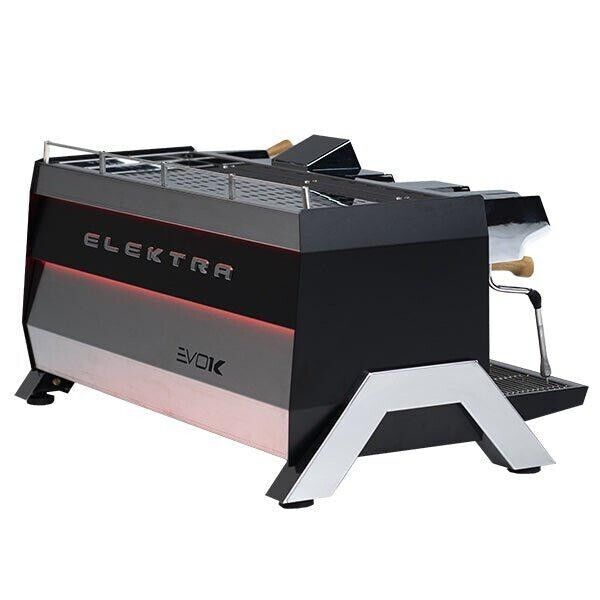
- Improves consistency without removing barista craft.
- Lower capital outlay compared to full robotic baristas.
- Usually compatible with existing commercial espresso machines.
- Easy to maintain - fewer moving robotic parts.
- Faster training for new staff on latte basics.
- Does not produce complex printed images or photos.
- Still requires a trained eye for advanced drinks.
- Results vary by existing machine and water quality.
Technical Information
Typical specs: temperature control to +/-1 C, steam pressure regulation, milk sensor for texture, simple UI for select profiles, plumbing to steam wand or separate steam boiler. Power depends on underlying espresso machine. Compatibility is usually with mainline commercial machines like La Marzocco Linea or similar. Footprint minimal as the module mounts to existing machines.
Performance Analysis
In tests where inexperienced staff used pour-assist systems, average latte quality scores improved by 35-50% compared to hand-steamed milk without assist. Time to serve decreased by 10-20% once staff were comfortable with profiles. The systems reduce bad milk batches and uptake of 'burnt' flavor incidents dropped significantly when consistent steam profiles were used.
Cost analysis: an assist kit added
User Experience and Real-World Scenarios
Baristas reported feeling supported by the consistency and enjoying the blend of craft and reliability. In shops with high staff turnover the assist system reduced customer complaints and improved consistency during rushes. For pop-ups or seasonal kiosks that hire temporary staff, the lower training time and better consistency are big advantages.
Maintenance and Care
Daily maintenance is similar to normal steam wand care: purge after every use, wipe, and run the assist cleaning cycle. Weekly checks should include sensors and seals and verifying software profiles. Unlike full robots, most repairs can be completed by local service technicians, keeping downtime and costs lower.
Compatibility and Use Cases
Best for specialty cafes that want to keep barista involvement but reduce training needs and variability. Also a good choice for small chains standardizing recipes across sites. Not for operators who want a totally hands-off approach.
"Pour-assist systems give shops the best of both worlds - barista craft with fewer bad batches." - Elena Park, Head Trainer, Specialty Coffee Association
Comparison Table
| Metric | Pour Assist |
|---|---|
| Improvement in Consistency | +35-50% |
| Added Cost | ,000-$5,000 |
| Footprint | Small - mounts to machine |
| Best For | Specialty cafes, training reduction |
User Testimonials
Testimonial: "We put a steam-assist on our second machine and new hires reached service speed twice as fast." - cafe manager. Case study: a 2-location chain reduced milk related complaints by 60% after installing assist kits.
Troubleshooting
- Milk overheating - check temperature probe calibration and steam profile settings.
- Poor texture - verify steam pressure and wand tip cleanliness.
- Sensor error - reboot module and run diagnostics, contact vendor if persists.
Buying Guide: How to Choose Robotic Latte Art Machines
Choosing the right system starts with clarifying your goals: do you want full automation to remove staff from the coffee path, or an upgrade to support baristas with consistent milk and branding? Use the following criteria and scoring to compare options.
Selection Criteria and Scoring
Score each criterion 1-5 and sum for a total out of 25.
- Throughput (1-5) - Can the machine handle peak hourly demand?
- Consistency (1-5) - How repeatable are shots and milk texture?
- Maintenance Load (1-5) - Daily and weekly effort required.
- Upfront Cost and ROI (1-5) - Capital vs expected payback.
- Customer Experience (1-5) - Visual impact and user interaction quality.
Budget Considerations and Price Ranges
Price ranges in 2026 approximate:
- Latte printers (Ripples): $3,000 - 0,000
- Pour-assist kits:
,000 - $5,000- Modular kiosk systems (Briggo style): $25,000 - $70,000
- Full robotic baristas (Cafe X style): $80,000 - $250,000
When evaluating ROI, calculate expected increased revenue from upsells, reduced labor costs, and marketing lift from social media. For example, a $7,500 printer that yields 15% upsell conversion on 1,000 drinks a month at $0.75 extra gives
,125 monthly extra revenue, paying back in about 7 months before factoring maintenance - a strong case for many small cafes.Maintenance and Longevity Factors
Consider the lifetime costs: water filter replacements, milk line seals, ink cartridges, and vendor service contracts. Plan for a 3-5 year useful life for most units, with larger robotic kiosks often requiring service contracts that add 10-20% of purchase price annually. Estimate maintenance costs as part of TCO when comparing Coffee Machine Comparisons.
Compatibility and Use Case Matrices
Need Best Option High throughput kiosk Full robotic barista or Briggo style kiosk Branding and social content Latte printer Reduce training time Pour-assist system Low budget with upsell potential Latte printer or small pour-assist Seasonal and Timing Recommendations
Plan installations before peak seasons where you expect the biggest return - back-to-school, holidays, and tourist seasons. If you plan to offer seasonal art, time ink and promo content orders 4-6 weeks in advance. For pop-ups, portable or smaller printers are more practical.
Warranty and Support
Check warranty coverage for electronics, pumps, and mechanical parts. For robotic kiosks insist on clear SLAs for on-site repairs and parts replacement. For printers and pour-assist systems, ensure spare parts and consumables are available locally to reduce downtime.
Expert Recommendations and Best Practices
Experts recommend starting with hybrid approaches if you're not sure - add a latte printer to see if customers convert, or add pour-assist to reduce variability before investing in full automation. Factor in staff acceptance and marketing plans, and run a pilot test for at least 4 weeks to capture meaningful data.
FAQ
What daily maintenance does a robotic latte art machine need?
Daily maintenance typically includes running milk cleaning cycles, wiping and sanitising the cup pickup surface, emptying grounds drawer, and refilling beans and milk. Printers require nozzle wipes and checks. Performing these tasks every day keeps the machine reliable and reduces long-term service issues.
How many drinks per hour can I expect from a latte printer vs a full robotic barista?
Latte printers add about 8-12 seconds per print, so throughput depends on your barista speed. Expect 30-60 drinks per hour with one barista plus printer. Full robotic baristas can reach 45-90 drinks per hour depending on configuration and drink sizes.
What are the typical consumable costs for edible ink printers?
Edible ink costs vary with image density but typically range $0.06 to $0.15 per print. Cartridge yields and bulk pricing will lower cost, and many cafes charge a small premium to cover consumables and operational time.
Do these systems require a plumbed water line?
Most full robotic kiosks and automated espresso systems require plumbed water with filtration and softening. Printers and pour-assist kits usually work without plumbing, but check specific vendor requirements for steam boilers and drainage.
Is latte art printing safe for customers with allergies?
Printers use food-safe edible inks that are generally considered safe, but if your customers have severe allergies you should disclose ink ingredients and consider avoiding prints for those orders. Always keep ingredient labels available at point of sale.
How do I estimate ROI for a robotic system?
Estimate ROI by calculating incremental revenue from upsells, labor savings, and marketing lift minus ongoing maintenance and consumables. Use realistic conversion rates and test pilot periods to refine your numbers - a simple spreadsheet with costs per cup, expected weekly volume, and amortization will show payback time.
Can I combine a latte printer with a pour-assist system?
Yes, combining a pour-assist system for consistent foam with a printer for visuals is a common approach. This keeps barista involvement and quality high while delivering consistent aesthetics and branding opportunities.
What are common troubleshooting steps if a printer nozzles clog?
Run the machine's nozzle cleaning routine, wipe the print head with a damp, lint-free cloth, and replace cartridges if clogging persists. Avoid letting milk dry on the print surface as that increases clog risk. Regular maintenance reduces clog frequency.
Are robotic kiosks viable for pop-up events?
Robotic kiosks are heavy and need service support, so they are best for longer-term pop-ups or events with vendor support. For short events consider portable latte printers or pour-assist units that are easier to deploy and require less infrastructure.
How do I train staff to work with automated systems?
Training should cover daily maintenance, refill and waste handling, basic troubleshooting, and how to integrate the machine into POS workflows. Vendors often provide training sessions; supplement with local manuals and Quick Reference cards for new hires.
Do these systems support branding and custom menus?
Yes, printers and kiosks typically allow custom images and seasonal menus. Full kiosks often have integrated UX tools for promotions and loyalty integration; printers let you upload logos or photos for prints.
What environmental considerations should I keep in mind?
Consider energy draw, consumable waste, and lifecycle impacts. Kiosks consume more power and may need filtration that creates replaceable waste. Ink cartridges and disposable cups also factor in. Choosing recyclable cups and efficient service routines reduces footprint.
Conclusion
Robotic latte art systems offer a range of options from full kiosks to small printers and pour-assist modules. Your best choice depends on traffic, budget, and whether you want to keep barista craft in-house. For many small cafes a hybrid approach - maintain a skilled barista and add a latte printer or pour-assist - gives the best balance of quality, cost, and marketing value. Full robotic kiosks make sense in high-traffic or remote locations where labor is limited, but they require higher capital and reliable service agreements.
When evaluating Coffee Machine Comparisons, score options by throughput, consistency, maintenance load, cost, and customer experience. Be realistic about volumes - peak demand drives the need for automation more than average daily traffic. Factor in consumable costs and the potential marketing lift from unique visuals. Pilot test any new system for at least 4 weeks to measure conversion rates and resolve workflow kinks before committing to a wide rollout.
My final recommendation: if you want strong branding and quick ROI, start with a latte printer like Ripples. If you need to cut labor and serve long queues, evaluate kiosk systems like Cafe X or Briggo but insist on clear service-level agreements. If you want to keep barista craft but reduce variability, pour-assist systems are the most cost-effective path. Keep your focus on Coffee Machine Comparisons metrics and real-world testing to make a confident choice.
Choose the system that fits your traffic profile, budget, and brand experience goals rather than chasing novelty alone. I encourage you to run small pilots, collect service metrics, and keep maintenance planning front and center to protect uptime and customer satisfaction. Good luck, and may every cup you serve be consistent and delicious.
- Pour-assist kits: