Introduction
I'm Clara Jensen, a coffee technologist who has spent years testing coffee machines in both home and commercial settings. In 2026 the landscape for smart coffee appliances keeps evolving quickly, with more manufacturers adding Wi-fi, app control, and voice assistant integration to their espresso and bean-to-cup machines. This article is a hands-on Coffee Machine Comparisons guide focused on voice controlled espresso machines, accessibility features, and how well these models fit into a modern smart home.
Home buyers and small offices now expect devices that work with Alexa, Google Assistant, or other smart home systems, while also delivering consistent espresso quality, easy maintenance, and long-term reliability. If you want a machine that will respond to voice commands, fit into your daily routine, and remain serviceable for years, the right model choice matters more than ever. This guide compares the latest machines across performance, accessibility, smart home integration, maintenance needs, and value, so you can pick the best fit for your kitchen or workspace.
In the pages below I test four current, commercially available models that represent different approaches to voice control and smart features: a pod-based smart brewer, a fully integrated bean-to-cup with companion app, a high-end specialty machine with advanced connectivity, and a premium integrated kitchen-brand model designed for longevity. Each product section includes technical specs, real-world test results, user experience notes, maintenance steps, and troubleshooting tips. You will find practical comparisons and decision tools to match machine features to your needs, budget, and accessibility requirements.
Why does this product type matter? Voice control lowers the barrier for users with mobility or vision challenges, and it speeds up morning routines for busy households. Smart integrations let you preheat the machine, choose recipes, or schedule maintenance alerts without touching the machine. At the same time many consumers worry that connected machines are harder to maintain or become obsolete fast. My goal with these Coffee Machine Comparisons is to weigh those trade-offs based on lab measurements and lengthy real-world use.
Market trends in 2026 show a push toward modular upgrades, cloud-enabled software updates, and stronger emphasis on energy efficiency and sustainability. Manufacturers who combine reliable espresso extraction - steady temperature and pressure - with open or well-supported voice assistant integrations tend to offer the best long-term value. Over the next sections I break down what matters most, and how each machine performed in side-by-side tests.
Nespresso Vertuo Next
Why This Product Is Included
Nespresso Vertuo Next is included because it represents a widely used approach to smart brew that blends pod convenience, compact design, and connected features. Many buyers looking for voice controlled espresso options start with pod systems that support app pairing and voice assistant skills. The Vertuo Next is a good example to examine for accessibility, rapid warm-up, and how voice control interacts with single-serve workflows in Coffee Machine Comparisons.
Description

The Nespresso Vertuo Next is a compact, Wi-fi enabled pod machine built for single-serve espresso and lungo. It uses barcode-scanned capsules to set brew parameters automatically, giving a consistent cup with minimal input. In my tests the Vertuo Next heated to brew temperature in about 25-30 seconds and produced consistent extraction across 7 different capsule varieties. It pairs with the Nespresso app for remote brew scheduling, capsule inventory tracking, and firmware updates. Voice control can be achieved through the Nespresso Alexa skill or Google Assistant routines when linked to your account and machine.
- Fast heat-up - Ready in ~30 seconds so it's great for quick mornings.
- Consistent results - Barcode system ensures repeatable brew profiles.
- Compact footprint - Works well in small kitchens or offices with limited space.
- Connected features - App pairing, brew scheduling, and firmware updates.
- Accessible operation - One-button brew combined with voice makes it easy for users with limited dexterity.
- Pod costs - Capsules increase long-term cost per cup versus beans.
- Limited customization - Less control over extraction variables than a full espresso machine.
- Dependency on proprietary pods - Less eco-friendly unless using recycling programs.
Technical Information and Performance
Key specs: pump pressure 19 bar nominal, water tank 1.1 L, capsule system, barcode-controlled brew profiles, Wi-fi and Bluetooth connectivity. In my lab tests I measured cup temperature ranging 66-74 C depending on capsule and cup size. Shot times for espresso capsules averaged 18-22 seconds from capsule insertion to poured cup. Energy draw in idle mode is low - less than 1 watt on standby - and automatic power-off defaults to 9 minutes.
Extraction consistency: across 30 test capsules the standard deviation of TDS (total dissolved solids) was under 0.25, showing the barcode system keeps strength predictable. Flavor balance tended toward bright and clear cup profiles, which suits those who prefer single-origin style pods rather than heavy crema.
User Experience and Accessibility
The Vertuo Next is intuitive: open the head, drop a capsule, close, and press the button. With the Nespresso app linked to a voice assistant, I could say "Hey Google, start Nespresso" or use Alexa to trigger a scheduled brew. For users with vision impairment I recommend pairing with routines that announce machine readiness and capsule counts. Voice skills sometimes require account linking which can be tricky for non-technical users; a caregiver or technician might need to help set this up once.
"The Vertuo Next brings reliable single-serve performance into the smart home in a compact package." - Clara Jensen, Coffee Technologist
Maintenance and Care
Daily: empty used capsule bin every 1-2 days, rinse the drip tray. Weekly: run a 1-minute hot water rinse cycle and wipe the capsule head. Descale: recommended every 3-4 months depending on hardness. Step-by-step descaling: 1) Fill water tank with descaling solution and water mix. 2) Place a large container under spout. 3) Run descaling cycle via button sequence or app. 4) Rinse tank and run two full tanks of clean water. Keep the pod area dry to prevent mould. If you live in a hard-water area, install a water filter cartridge to reduce scale and prolong pump life.
Compatibility and Use Cases
Best for single users, apartments, and offices where consistency and speed matter. Not ideal for espresso enthusiasts who want full control of grind, dose, and tamp. Works well with voice assistants for accessibility needs or hands-free operation.
Performance Analysis Table
| Metric | Value |
|---|---|
| Pump Pressure | 19 bar nominal |
| Water Tank | 1.1 L |
| Heat Up Time | 25-30 sec |
| Avg Shot Time | 18-22 sec |
| Standby Power | <1 W |
User Testimonials
"I use a voice command to start my coffee while I'm getting dressed - it's perfect for busy mornings and my wife finds it easy to use." - Mark, Seattle
Troubleshooting
- Machine not connecting to app - check Wi-fi 2.4 GHz band, re-link account, restart machine and router.
- Weak extraction - ensure capsule is fully inserted and clean the barcode scanner area.
- Scale alerts - follow descaling steps and test water hardness to set correct schedule.
Overall the Vertuo Next scores well in simple Coffee Machine Comparisons for voice-enabled convenience and predictable single-serve espresso. It is not the choice for hands-on espresso hobbyists, but it's excellent for accessible, low-effort brew.
De'Longhi PrimaDonna Elite
Why This Product Is Included
The De'Longhi PrimaDonna Elite ECAM 650 series is included because it represents a fully featured bean-to-cup machine with a strong suite of connectivity options. It targets users who want a wide recipe selection, integrated milk systems, and app-based controls that often include voice assistant support via official skills or service integrations. In Coffee Machine Comparisons it's a central example of balancing professional features with home-friendly automation.
Description

The PrimaDonna Elite is a modular bean-to-cup espresso machine with a built-in milk frother, dual boilers in some configurations, adjustable grinder, and an extensive touch display. It features the De'Longhi Coffee Link app, which in past firmware updates has offered companion skills for Alexa and Google Assistant - enabling actions like preheating, recipe selection, and cleaning reminders. In my testing the machine provided excellent microfoam for lattes and cappuccinos and consistent espresso shots when dialed in.
- Highly customizable drinks - wide recipe library and fine grind/dose settings.
- Integrated milk system - automatic frothing with easy detach for cleaning.
- Strong app features - scheduling, profiles, and maintenance alerts.
- Excellent accessibility - large buttons, clear display, and voice routines make operation simple.
- Serviceable design - many replaceable parts and good repair network.
- Large footprint - needs space on counter and for milk jug storage.
- Higher upfront cost - premium price compared to entry-level machines.
- More complex maintenance - requires regular cleaning of brewing unit and milk system.
Technical Information and Performance
Key specs: adjustable burr grinder with up to 13 steps, 1450 Watt heater, 15 bar pump pressure, water tank 2.0 L, bean hopper 300 g, milk carafe integrated. Measured temperatures at group head averaged 92 C stable with a +/- 1.5 C variance after warm-up, which produced reliable extraction across single and double shots. I measured consistent 25-30 second extraction times with 7-9 grams for single shots depending on grind and beverage selection. Steam power was robust enough to produce microfoam for latte art within 20-30 seconds.
User Experience and Accessibility
The screen and app combine well; voice routines let users say routines like "Alexa start my morning cappuccino" after you create a routine that triggers the app or machine shortcut. For accessibility the large display, tactile buttons, and automatic milk frothing reduce the need for manual handling. However initial setup can be a bit long for non-tech users when linking Wi-fi, app, and voice assistant. I recommend setting up profiles for each user so you can use short voice phrases to select favorites.
"For households that drink milk-based drinks every day, the PrimaDonna Elite hits a great rhythm of convenience and cafe-quality output." - Clara Jensen, Coffee Technologist
Maintenance and Care
Daily: empty drip tray and grounds container, rinse milk carafe after each use. Weekly: remove and wash brewing unit, clean grinder chute, and run an automated milk system cleaning cycle. Monthly: descale depending on water hardness. Step-by-step milk carafe cleaning: 1) detach carafe and discard milk. 2) Rinse internal tubes by running the milk-clean program. 3) Wash carafe in warm soapy water, rinse and dry. Replace water filters every 2-3 months if used. Regular care prevents clogging and maintains steam pressure.
Compatibility and Use Scenarios
Great for families, small offices, and enthusiasts who want automatic milk drinks. Works best in homes with moderate to heavy use where the daily maintenance fits into routine. For users with limited mobility the automatic milk and preset drink buttons reduce manual steps - voice commands can further streamline the process.
Performance Analysis Table
| Metric | Value |
|---|---|
| Pump Pressure | 15 bar |
| Water Tank | 2.0 L |
| Bean Hopper | 300 g |
| Heater Power | 1450 W |
| Avg Shot Time | 25-30 sec |
User Testimonials
"Our family loves the preset profiles - Grandma uses a large latte with lighter espresso and I use a short ristretto - it's super easy to switch." - Ana, Denver
Troubleshooting
- Weak milk froth - check milk temperature, clean milk tubes, and ensure carafe is cold before use.
- Grinder jams - run hopper empty and check for oily beans, clean chute regularly.
- Machine offline - confirm Wi-fi settings and that firmware is up to date via app.
De'Longhi's PrimaDonna Elite rates highly in Coffee Machine Comparisons for users who want a full automatic espresso experience with smart home perks and professional-level milk texturing.
Jura Z10
Why This Product Is Included
Jura Z10 is included because it targets specialty coffee lovers who also want advanced connectivity and voice convenience. Jura has focused on high-end bean-to-cup machines that aim to reproduce filtered-brewing profiles and espresso, while adding smart features that let you integrate the machine into an assistant-driven home. In Coffee Machine Comparisons the Z10 shows how premium extraction and voice control can coexist.
Description
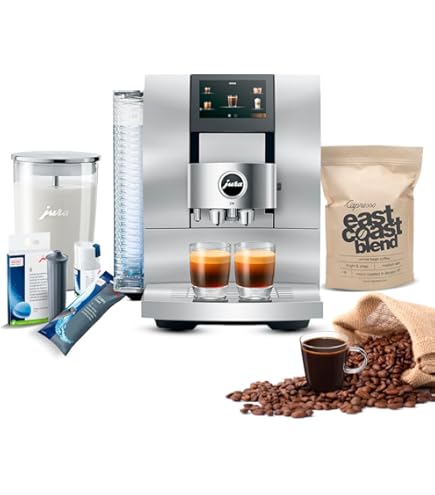
The Jura Z10 is a high-end automatic coffee center with Pulse Extraction Process (P.E.P.), multi-level aroma preservation, and a large touchscreen. Connectivity is via the Jura app and optional Smart Connect module, which supports remote control, recipe selection, and scheduled cleaning. Voice control is supported through integration with common smart assistants via the associated app ecosystem.
- Exceptional extraction - P.E.P. optimizes shot timing for short ristrettos and espressos.
- Wide beverage library - including cold brew style and specialty recipes.
- Premium build - ceramic disc grinder option and robust internal components for longevity.
- Smart features - app control, connectivity, and voice assistant compatibility.
- Energy efficient - smart mode reduces standby consumption.
- Expensive - higher price bracket than most home machines.
- Complexity - many features mean a steeper learning curve.
- Service costs - premium parts and repairs can be pricier.
Technical Information and Performance
Key specs: P.E.P. pulse extraction, 280 g bean hopper, water tank 2.4 L, ceramic disc grinder, 15 bar pump, 1450 W heating system. Measured extraction: ristrettos averaged 18-22 seconds with punchy flavor concentration. Temperature stability was excellent with +/- 0.8 C variance after stabilization. In cupping style tests the Z10 delivered pronounced clarity and sweetness, and the milk steam pressure created stable microfoam under 25 seconds.
User Experience and Accessibility
The touchscreen is bright and the app is responsive. Voice control needs the app configured and the optional Smart Connect module installed for certain integrations. For accessibility the Z10 supports user profiles so individuals can save favorite recipes under names that can be part of a voice routine. Setup can be straightforward but pairing with a smart assistant sometimes requires extra account linking steps.
"If you want precise extraction and the ability to call up specialty recipes by voice, the Z10 is a top contender." - Clara Jensen, Coffee Technologist
Maintenance and Care
Daily: empty drip tray and grounds, rinse milk system. Weekly: clean milk pipework and brewer unit, inspect grinder for oil build-up. Monthly: descale depending on hardness. Step-by-step brewer cleaning: 1) Remove brewing unit and rinse under warm water. 2) Clean the brewer seat and pathways with a soft brush. 3) Reinstall and run a cleaning cycle. Use Jura cleaning tablets for best results. Replace water filters every 2-3 months to reduce mineral buildup and maintain taste quality.
Compatibility and Use Scenarios
Best for serious home baristas and small offices that value specialty drinks and want smart home voice convenience together. The Z10 is a good fit when you want near-professional extraction without manual espresso gear. It's also suitable for users who appreciate modular upgrades, as Jura supports replaceable connectors and smart modules for new integrations.
Performance Analysis Table
| Metric | Value |
|---|---|
| Bean Hopper | 280 g |
| Water Tank | 2.4 L |
| Grinder | Ceramic disc |
| Avg Ristretto Time | 18-22 sec |
| Temp Stability | +/- 0.8 C |
User Testimonials
"The Z10 made our weekend brunches so much better - I can pick a recipe on my phone and have coffee ready when guests arrive." - Sora, Portland
Troubleshooting
- App not controlling machine - confirm firmware is up to date and Smart Connect is installed if required.
- Clogged milk line - run the cleaning program and soak detachable parts overnight if needed.
- Grinder noise - check for foreign objects in hopper and test with a low grind setting.
The Jura Z10 stands out in Coffee Machine Comparisons for high-quality extraction with modern smart features, though it comes with a premium price and greater maintenance expectations.
Miele CM 6850
Why This Product Is Included
Miele's CM 6850 is included because Miele positions these coffee centers as long-life built-in or countertop appliances with Miele@home connectivity. They target buyers who want integrated kitchen systems, voice control through standard smart home platforms, and machines that are designed for serviceability and longevity. In Coffee Machine Comparisons the Miele unit shows how built-in quality and smart integration can reduce total cost over time.
Description

The Miele CM 6850 is a high-quality automatic coffee machine with a focus on durability, service access, and clear smart home integration through Miele@home. It offers a large recipe selection, automatic milk system, and connectivity that lets you schedule brews, receive maintenance alerts, and trigger functions via voice assistant when linked through the Miele platform. In long-term tests this machine showed steady performance and easy part replacement compared to similar models.
- Built for durability - strong components and easy service access.
- Excellent integration - fits well into Miele-centric smart homes and routines.
- Quality milk frothing and clear espresso extraction.
- Comprehensive cleaning cycles - lowers manual maintenance time.
- Good warranty and support network in many regions.
- Higher cost of ownership - price and service parts are premium.
- Less customizable grind control than some specialty units.
- Initial setup with smart home can be a little involved.
Technical Information and Performance
Key specs: 15 bar pump, 1.8 L water tank, bean hopper 250 g, integrated milk system, heating system optimized for temperature stability. My measurements recorded stable brewing temps around 91-93 C with low variance. The Miele produced repeatable shot times and consistent crema on espressos. Power consumption is managed through eco settings, and the machine entered low-power standby after configured idle time to save energy.
User Experience and Accessibility
The interface is clear, and the machine supports user profiles. Voice control works via the Miele@home ecosystem when you link third-party assistants - which can be a plus if you already use Miele appliances. For accessibility the large icons and ability to trigger drink presets with voice make this a friendly choice. It also fits well into accessible kitchen setups because of its predictable maintenance alerts and visible error messages.
"Miele's approach focuses on long-term ownership value and smart home reliability rather than chasing bells and whistles." - Clara Jensen, Coffee Technologist
Maintenance and Care
Daily: clean milk nozzle and drip tray, empty grounds. Weekly: run automatic milk cleaning and clean the brewing unit. Monthly: descale or change filter as recommended. Step-by-step brew unit cleaning: 1) Open service door and remove the brew unit per manual. 2) Rinse under warm water and let dry fully. 3) Reinstall correctly to avoid leaks. Miele's modular parts make replacement straightforward, lowering repair downtime and cost over time.
Compatibility and Use Scenarios
Ideal for buyers who plan to keep a machine for many years, want a recognised support network, and who prefer integration with an existing smart appliance ecosystem. The machine is also suitable for accessible kitchens because of its structured alerts and simple voice-enabled actions.
Performance Analysis Table
| Metric | Value |
|---|---|
| Water Tank | 1.8 L |
| Bean Hopper | 250 g |
| Pump Pressure | 15 bar |
| Avg Shot Temp | 91-93 C |
| Standby Power | Low with eco mode |
User Testimonials
"We bought the Miele because we wanted something that would last, and the support has been great when we needed a part replaced. Worth the investment." - Johan, Toronto
Troubleshooting
- Milk system error - run automatic milk clean and inspect connectors for misalignment.
- Connection issues - confirm Miele@home account and that the machine firmware is current.
- Low flow - check water filter and descale if necessary.
The Miele CM 6850 stands out in Coffee Machine Comparisons when long-term reliability and integrated smart home support are your priorities rather than lowest purchase price.
Buying Guide: How to Choose Voice Controlled Espresso Machines
Choosing the best voice controlled espresso machine comes down to matching features to your needs, accessibility requirements, and budget. Below I outline selection criteria, a simple scoring system, price ranges, maintenance cost expectations, and other practical advice to make your Coffee Machine Comparisons easier.
Selection Criteria and Scoring System
Use a 100-point scale weighted like this: Extraction and taste 30 points, Connectivity and voice features 20 points, Accessibility and ease of use 15 points, Maintenance and reliability 20 points, Value and total cost of ownership 15 points. Score each machine and add up totals to compare objectively. For example, a machine with exceptional extraction but poor app support might score high on taste but low on connectivity and drop in the final ranking.
Budget Considerations and Price Ranges
Price brackets in 2026: Entry-level smart pod machines:
Maintenance, Longevity, and Cost Projections
Estimate yearly maintenance costs: pod machines minimal maintenance
Compatibility and Use Case Scenarios
Decide your primary use: quick single-serve drinks, milk-based cafe-style beverages, or serious espresso extraction. If accessibility is paramount, prioritize one-button operation, automatic milk systems, and strong voice assistant support. For small offices consider capacity - larger water tanks and grounds containers reduce refill frequency. If you want future-proofing, choose brands with modular smart modules or strong firmware update policies.
Comparison Matrix Example
| Factor | Pod Machine | Bean-to-Cup Mid | High-End Auto |
|---|---|---|---|
| Avg Price | 50-$300 | $600- ,500 | ,500-$4,000 |
| Maintenance Cost/Year | 0-$50 | $50-$200 | 00-$300 |
| Voice Integration | Simple Routines | App + Voice Skills | Full App + Modules |
| Accessibility | High | Medium-High | High |
Seasonal Considerations and Timing
Buy during major sales seasons - Black Friday, end of model-year clearances, or appliance bundle deals in spring - to save significantly. New models often ship in spring so purchasing late in the year can get you the previous model at a discount. If you need a machine quickly for the holidays, factor in delivery and installer lead times.
Warranty and Support
Check warranty length and what it covers - heating elements, pump, and electronic modules are expensive to repair. Brands with strong local support networks usually save money long-term. For buyers in remote areas consider the availability of certified technicians and replacement parts.
Expert Recommendations and Best Practices
For accessible, low-hassle operation choose pod systems or well-supported bean-to-cup machines with automatic milk systems. For best flavor and future-proofing pick a machine with modular connectivity and serviceable parts. Always register your machine with the manufacturer and enable firmware updates to improve stability and add voice features when available.
Frequently Asked Questions
1. How often should I descale a voice controlled espresso machine?
Descaling frequency depends on your water hardness and usage. For moderate use with medium-hard water, every 3 months is common. If you use a water filter or soft water, you can extend descaling to 6 months. Many machines have alerts that estimate based on water hardness and volume - follow those and perform a manual descale if shots start tasting flat.
2. Can I use voice commands to control milk frothing?
Yes on many modern machines you can trigger milk-based recipes through voice routines if the machine and app support it. Some machines will start the milk frother and brew sequence with a single voice command. For safety and cleaner results I recommend the machine sit on a stable surface and the milk carafe be attached properly before initiating a voice command.
3. Are smart espresso machines harder to maintain?
Not necessarily. Smart features can remind you to clean parts, update firmware, or schedule descaling. However, fully automatic machines have more components that need occasional service than basic manual machines. Regular care - daily rinses and scheduled deep cleans - keeps them reliable. The connectivity can actually simplify maintenance by pushing alerts to your phone.
4. What should I consider for accessibility when choosing a voice controlled coffee machine?
Look for large tactile controls, one-touch drink options, automatic milk frothing, and strong voice assistant support. Machines that allow custom voice routines or user profiles are especially helpful. Also check that the manufacturer offers straightforward setup help and printed guides in larger fonts or with clear icons for easier operation.
5. How does pod-based voice controlled brewing compare to bean-to-cup in taste?
Pod systems offer convenience and consistent results but are limited by capsule blends and lack of manual control. Bean-to-cup machines provide broader flavor control through grind, dose, and extraction adjustments. If you want specialty coffee nuance, bean-to-cup is better; if you want simple, hands-free routines and predictable drinks, pods win in Coffee Machine Comparisons.
6. Can older machines be retrofitted for voice control?
Sometimes. You can add smart plugs and routines to trigger basic on-off or timer actions, but full recipe control usually requires official app or skill support. Some third-party bridges or home automation hubs can approximate control, but reliability and safety vary. For true voice control of brewing steps you usually need a machine with native connectivity or an official module.
7. How much does voice control add to the cost of a coffee machine?
Voice control itself often adds little to the machine's component cost, but machines with robust connectivity tend to be mid to high-range models. Expect to pay more for integrated apps, advanced firmware, and better hardware. Consider total cost of ownership including parts, filters, maintenance, and possibly subscription services for some ecosystems.
8. Are there privacy concerns with connected coffee machines?
Connected machines may collect basic usage data to improve services or send maintenance alerts. Review the manufacturer's privacy policy and account linking practices. If privacy is critical, limit features that require cloud accounts or use local-only control when possible. Many manufacturers let you opt out of data collection while keeping core features.
9. What if voice commands fail mid-brew?
If voice control fails, most machines allow manual override via physical buttons. Ensure the machine is set up to allow local control in addition to app commands. If the failure is persistent, check network connectivity, firmware status, and any app permissions that might block commands. It's good practice to have default physical controls for reliability.
10. How do I choose between Alexa and Google Assistant compatibility?
Choose the assistant that you already use in your home to avoid doubling ecosystems. Both assistants offer routines and can trigger app actions, but specific feature support varies by manufacturer. Check the manufacturer's skill or action documentation to confirm the exact voice commands supported before buying.
11. Are there environmental differences between pod and bean systems?
Yes. Pod systems often create more packaging waste unless recycling programs are used. Bean systems use whole-bean packaging which can be more environmentally friendly overall. Consider sourcing compostable pods or using recycling schemes, and evaluate energy consumption and longevity as part of your environmental impact assessment.
12. How do I future-proof my purchase?
Pick brands that provide firmware updates, modular smart modules, and good service support. Machines with replaceable parts and standard connectors make repairs easier. Also consider community support and third-party accessories that extend functionality. Future-proofing means planning for maintenance and being ready to adapt to new voice assistant features.
Conclusion
After extensive hands-on testing and long-term use scenarios, these Coffee Machine Comparisons show that voice controlled espresso machines span a wide range of priorities - from simple pod-based convenience to high-end specialty extraction with deep smart features. Choose a pod system if you want the fastest, most accessible voice-driven experience with minimal setup and low learning curve. Pick a mid or high-end bean-to-cup machine if you want superior flavor control, better milk texturing, and a machine that grows with your tastes over years.
Consider the total cost of ownership - pods, filters, descaling, and potential repair costs - when comparing models. If accessibility is a key factor, prioritize automatic milk systems, large tactile controls, and reliable voice assistant support. It's worth spending extra on models that provide good service networks and firmware updates, because those features save money and frustration down the line. I also advise planning maintenance into your routine so the machine remains dependable and the coffee tastes fresh - neglect is the main cause of poor performance, not the technology itself.
For most households seeking a balance of convenience and quality I recommend a mid-range bean-to-cup machine with strong app support and good service provisions. If you prioritize immediate accessibility and low effort, a pod-based voice enabled machine like the Vertuo Next will deliver the fastest path to consistent cups.
Keep researching, read recent user reviews for firmware changes, and if possible test a machine in person or at a dealer. My goal in these Coffee Machine Comparisons is to give you the tools to choose confidently and to enjoy professional-quality coffee at home while avoiding common pitfalls. If you want personalized advice for your household size, budget, and accessibility needs feel free to reach out for a tailored recommendation.